
APSDP Solutions - Smart Business Solutions | GSTIN: 21AWAPD7777M3ZA
APSDP Solutions - Smart Business Solutions | GSTIN: 21AWAPD7777M3ZA


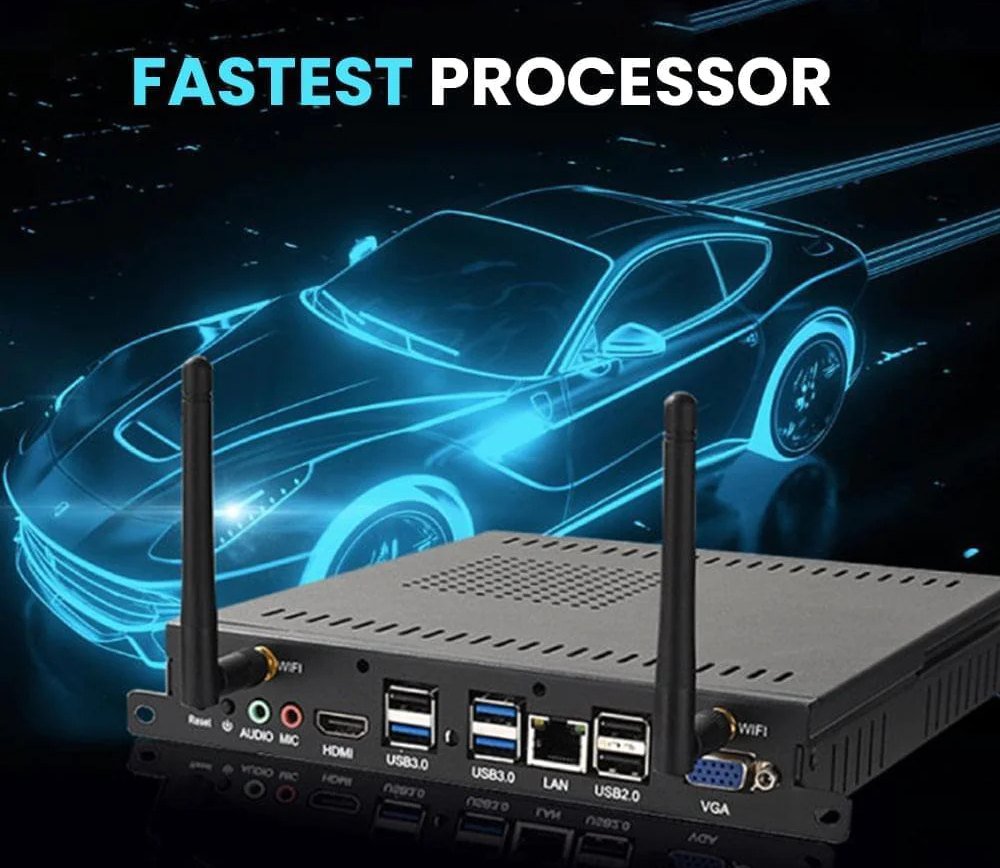
Upgrade compatible interactive flat panels with OPS Computer Systems from APSDP Solutions. These compact, slot-in computing modules can support Windows-based applications, digital teaching, presentations and business collaboration, depending on the selected configuration. Ideal for smart classrooms, colleges, training centres and meeting rooms. Contact APSDP Solutions in Bhubaneswar for OPS PC options, compatibility guidance and quotations across Odisha.
APSDP Solutions offers OPS Computer System solutions for organisations looking to enhance compatible Interactive Flat Panels (IFPs) with integrated computing capabilities. Designed for suitable OPS-compatible displays, an OPS PC provides a compact computing platform for supported applications used in education, presentations, training and business collaboration.
OPS stands for Open Pluggable Specification. An OPS Computer is a slot-in computing module that fits into a compatible interactive flat panel's dedicated OPS bay. Instead of connecting a separate desktop computer to the display, users can operate supported computer applications through the integrated module.
For schools, colleges, training centres and corporate offices, an OPS Computer System can help create a streamlined digital working environment. Depending on the selected configuration, it may support Windows applications, office productivity software, educational tools, presentations and compatible video conferencing applications.
If you are planning a smart classroom project or upgrading an existing interactive display, APSDP Solutions can help you explore OPS PC configurations based on your display model, software requirements and budget.
An OPS Computer System is a compact computer module built to fit into a compatible display that supports the Open Pluggable Specification. It typically contains computing components such as a processor, RAM, storage and graphics hardware, with connectivity and operating-system options depending on the model.
Once correctly installed, the OPS module enables the compatible interactive flat panel to function as an integrated computing and display system. Users can switch to the computer input or operating environment and run supported applications directly on the panel.
An OPS computer may be particularly useful when an organisation needs a Windows-based environment for specific teaching software, office applications or other compatible programs that are not available in the display's built-in operating system.
Important: Not every interactive flat panel supports OPS. The display's OPS slot, connector, dimensions, power requirements and compatibility must be confirmed before purchasing a module.
An OPS computer is designed to fit into a compatible display's dedicated OPS compartment. This can reduce the need for a separate desktop tower and help keep the installation organised.
A compatible OPS PC can allow users to run supported computer applications directly on an interactive flat panel. This is useful for digital lessons, office documents, presentations, training materials and compatible conferencing software.
Depending on availability, OPS computers may be offered with different processor classes, such as Intel Core i3, i5 or i7 configurations. The appropriate option depends on the software being used, multitasking requirements, processor generation and project budget.
Do not select a processor solely by its i3, i5 or i7 label. Compare the actual processor model and generation, supported memory, storage and software requirements.
OPS modules are available in different memory and storage configurations, depending on the manufacturer and model. RAM supports multitasking, while SSD storage provides space for the operating system, applications and working files.
The appropriate configuration depends on the number and type of applications being used. Confirm the actual RAM capacity, SSD type, storage capacity and upgrade options before ordering.
Selected OPS computer models support Windows operating systems, while some configurations may support other operating systems. Compatibility depends on the module's hardware, drivers, firmware and licensing.
Before purchasing, confirm the operating-system version and edition, genuine licence requirements, application compatibility and available security updates.
A compatible OPS module uses the display's dedicated OPS interface to integrate computing with the panel. Depending on the design, the module may also provide accessible USB, network, audio or video connections for peripherals.
Check the selected model's port list rather than assuming all OPS computers offer identical connectivity.
Depending on the model, an OPS computer may support Wi-Fi, Bluetooth and wired Ethernet. These features can help connect to a network, compatible peripherals and supported wireless accessories.
Network requirements, available wireless standards and Bluetooth versions should be confirmed against the actual product specifications.
Because the module fits into the compatible display, an OPS setup can reduce the number of separate devices, external cables and power adapters needed for a conventional computer-and-display arrangement. The actual installation depends on the panel and OPS module design.
An OPS PC can provide a computer environment for supported educational applications, teaching resources, office software and other classroom tools.
Integrating a compatible OPS computer with an interactive flat panel can reduce reliance on a separate desktop tower. This may help keep the teaching area organised.
Teachers can use supported computer applications with the interactive display to explain lessons, show multimedia content, present documents and conduct digital learning activities.
A computer-equipped interactive panel can support different types of teaching materials and presentations from a single display, subject to software compatibility.
Schools and colleges can consider OPS computers when upgrading compatible interactive panels or designing new smart classrooms.
Run compatible office applications and display reports, proposals, charts and presentations on a suitable interactive flat panel.
Support document review, brainstorming, annotation and collaborative work using compatible applications.
Present training materials, demonstrations and digital resources through the integrated display.
Use compatible conferencing applications when the OPS configuration, network and required audio-video equipment support them.
An integrated OPS setup can help reduce the need for a separate computer tower and make the display area easier to manage.
Schools: Digital teaching, classroom presentations and educational applications.
Colleges and universities: Lectures, seminars, demonstrations and collaborative learning.
Training centres: Digital course materials, presentations and software-based demonstrations.
Corporate offices: Meetings, business presentations, employee training and document collaboration.
Conference rooms: Supported presentation and conferencing applications.
Institutional projects: Compatible interactive display installations that require integrated computing capabilities.
An OPS computer and a traditional desktop computer can both provide computing capabilities, but they serve different installation needs.
An OPS computer is designed to fit into a compatible display's OPS slot. This can provide a more integrated installation with fewer separate devices.
A desktop computer offers a more conventional, independently installed computing system and may provide greater flexibility for component upgrades or other hardware configurations, depending on the model.
Choose an OPS computer when integrated installation and compatibility with the interactive panel are priorities. Consider a separate desktop when your application requires a particular computer configuration or the display does not support OPS.
The right choice depends on performance requirements, installation constraints, maintenance preferences and total project cost.
Confirm the exact make and model of your interactive flat panel. Verify its OPS slot, connector standard, module dimensions and power requirements before purchasing.
Review the applications you intend to run and choose a processor configuration suitable for the workload. Compare processor model, generation and performance rather than relying only on the processor family name.
Consider the memory needed for multitasking and the SSD capacity required for software and files. Check whether the selected module allows future upgrades.
Confirm the supported operating system, licence, drivers, software compatibility and security-update requirements.
Check the required USB ports, Ethernet, Wi-Fi, Bluetooth, audio and external display connections against your intended setup.
Confirm the installation procedure, access to the module, service arrangements and support terms. Use a qualified installer when necessary.
Consider the OPS module, operating-system licence, installation, any required accessories and support terms. Choose a configuration that meets your needs without paying for unnecessary performance.
APSDP Solutions serves educational institutions, businesses and other organisations looking for technology products and integrated solutions in Bhubaneswar and across Odisha.
If you need an OPS Computer System for an interactive flat panel, our team can help you identify the relevant requirements and explore available configurations.
Before recommending a module, it is important to understand the interactive display model, intended applications, preferred processor, RAM, storage, operating system and required connectivity. This helps avoid compatibility issues and unnecessary expenditure.
Depending on the project and available services, assistance may include product selection, compatibility checks, configuration planning, installation coordination and user guidance.
Whether you are equipping a single classroom, upgrading a college lecture room or planning a corporate meeting space, contact APSDP Solutions to discuss your requirements.
Institution-focused technology: Products for schools, colleges, training centres and corporate environments.
Related product options: Explore interactive flat panels, digital podiums, IFP trolleys and other compatible smart classroom equipment.
Requirement-based selection: Identify an OPS configuration based on your display and software requirements.
Project-oriented support: Discuss compatibility, installation planning and related equipment requirements.
Odisha market focus: Serving customers across Bhubaneswar and other locations in Odisha.
Product availability, supported configurations, installation services, warranty terms and operating-system licensing should be confirmed with APSDP Solutions before ordering.
Looking for an OPS Computer System for your interactive flat panel?
Contact APSDP Solutions to discuss the display model, required processor, memory, storage, operating system, quantity and installation location. Sharing these details will help identify suitable available configurations and prepare a quotation based on your needs.
APSDP Solutions — Smart Technology. Integrated Solutions.
Website: https://apsdpsolutions.in
An OPS Computer System is a compact computing module designed to fit into a compatible interactive flat panel. It provides computing capabilities for supported applications without requiring a separate desktop computer in many installations.
An OPS PC is used to run supported computer applications on compatible interactive flat panels. Common applications include digital teaching, presentations, office software, training and collaboration.
No. The panel must support a compatible OPS interface. The connector, module dimensions, power requirements and other compatibility conditions should be checked against the exact display model.
The best processor depends on the applications and workload. Available configurations may include Intel Core i3, i5 or i7 processors. Compare the exact processor model, generation, RAM and storage before choosing.
Selected OPS computers support Windows, but supported versions and editions vary by model. Confirm operating-system compatibility, licensing, drivers and software requirements before purchase.
The terms are often used interchangeably. An OPS module is the compact hardware unit, while an OPS computer generally refers to the complete computing configuration within that module.
It can eliminate the need for a separate desktop in compatible installations. However, additional computers or equipment may still be needed for particular workloads, peripherals or network requirements.
It can run compatible Office applications when the hardware, operating system, software licence and application requirements are met. Confirm the exact software requirements before purchase.
Yes, when the OPS configuration supports the conferencing software and the necessary network, camera, microphone and audio equipment are available.
Upgrade options vary by model. Some modules allow memory or storage upgrades, while others have hardware limitations. Confirm supported capacities and upgrade procedures with the manufacturer or supplier.
Price depends on the processor and generation, RAM, SSD capacity, operating system and licence, connectivity, warranty and available configuration. Request a quotation for your specific requirements.
APSDP Solutions can discuss your requirements and help you identify the compatibility information needed to select a suitable module. Provide the panel brand and model so compatibility can be checked before ordering.
Yes, you can enquire about OPS computer options as part of a smart classroom project. Share the panel specifications, number of classrooms, software requirements and preferred configuration to discuss a suitable solution.
Partner with us to design, build, and scale intelligent digital solutions.